CEACT Classic

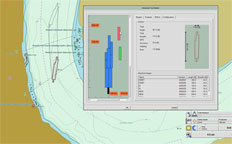
Screen1Advanced Tow Builder
Pilots can quickly choose individual barges from CEACT's internal barge database and place them anywhere in the tow, even on the hip.  Custom barges and even corporate barge database information can be added.  Scale units can be configured in feet and inches or meters.
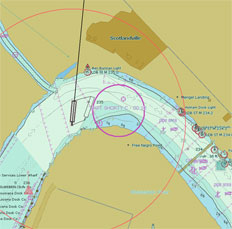
Screen2The most powerful chartware Data Recorders available
System logs from GPS, AIS, and Depth Sounders is continuously recorded to the system disc using CEACT's trouble free Feed and Release solution.  Data is purged from the system disc per user specifications.
CEACT chartware also includes an On the Fly recorder to capture short data segments, and a special Geographically X-Y-Z Corrected Depth Sounder Recorder.  All three recorders can be initiated individually or all at once.  The historical data can be retrieved and replayed at 1X or 8X speed using the standard playback features in CEACT.
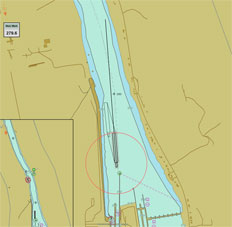
 

Screen3REAL TIME COURSE TRAJECTORY – FIRST INTRODUCED BY CEACT
One of the most important elements in CEACT Chartware, this feature is used by Line Boat Pilots operating on major inland waterway routes in North and South America.
This very distinctive feature is computed in real time using data that is provided by GPS based Heading Compasses. Any measurable force that acts on the vessel including wind, water current, steering or propulsion affects the vessel’s course trajectory.
The Real Time Course Trajectory feature in CEACT is credited with increasing vessel speed and efficiency, reducing fuel consumption, reducing weather delay, and reducing the stress level on pilots when operating in areas of restricted manoeuvrability.

CEACT uses the very powerful, IMO compliant ECDIS Kernel EC2007 from 7Cs.


Features of CEACT Classic


Features List
CEACT Classic
CEACT TRio & Secure
AIS Channel Meeting Point
check
check
AIS Target List and Find
check
check
Landscape or Portrait Display
check
 
Head or North Up Orientation
check
check
Scale Units: NM, SM or KM
check
check
Channel Text Orientation
check
check
Large or Small Text Size
check
check
Go to Position (Mile/KM)
check
check
Zoom to Selected Range
check
check
Smart Chart Panning
check
check
Automatic Chart Feed
check
check
Ship and Tow Configuration
check
check
Advanced Tow Builder Menu
check
 
Ten Color/Intensity Settings
check
check
Dual Variable Range Markers
check
check
Heading & Stern Marker Lines
check
 
Man Overboard Mark Display
check
check
Adjustable Ship View Display
check
check
Quick Mark Buoy/Objects Menu
check
check
Scaleable Rate of Turn Indicator
check
 
Channel Mile/KM Mark Display
check
check
Auto Channel ETA Calculation
check
check

Vessel Course Trajectory Display

(Limit to 60 sec. for Light)

check
check
Bow and Stern Slide Display
check
 
Full Pilot's Notes Controls
check
check
Past Track Display with Time Line
check
check
Past Track Multi-Archive Display
check
check
Full Feature Past Track Replay
check
 
Convert Past Track to Route Plan
check
check
Manual or Auto Route Planning
check
check
Manual Water Gauge Corrections
check
 
Dual Geo Ref. Depth Recorder
check
 
Anti-Grounding/AIS Target Alarm
check
check
Move and Hide Menus & Displays
check
check
Configurable Ship's Data Recorder
check
 
Digital PDF User Manual Menus
check
check
Quick Reference Guide Menu
check
check
GPS Accuracy Probability Outline
check
 
Auto Making Way Detection Alarm
check
 
Pilots Notes Automatic Backup
check
check
Filterable Soundings Display
check
check
SmoothGPS Optimization
check
check
View Official Bridge Imagery
check
check
Security by Dongle, MAC or Disk ID
check
 
Admin Support for Ghost Image
check
 
Support for Corporate Customization
check
 
Ship's eMail Map Tracking Option
check
check
Barge Database Tracking Option
check
 

Resellers
For sales, installation and support, please see our list of
CEACT authorized Value Added Resellers.

skyscaper